Strategy field guide

OpenFront.io Guide

Pick a strong spawn, protect your troop reserve, and spend gold where it matters. Learn the maps, units, and opening moves of OpenFront.io, the browser strategy game about taking territory and holding it.

Genre
Real-time strategy
Platform
Web browser
Modes
Solo and multiplayer

Official video tutorial

Watch tutorial

Learn spawning, expansion, and your first attacks.

Open in new tab

OpenFront.io maps

Read the terrain before you spawn. Look for room to grow, then trace the edge you’ll need to defend once the empty land is gone.

World

Look for a patch of flat land with an open side. A spawn tucked against a coast or mountain chain can leave fewer land fronts to watch. Check the far shore, too. Another player may reach your coastline by transport even if nobody shares a border with you.

Europe

The central and eastern plains give you room for early land grabs. Around the Alps or Scandinavia, look for corridors between difficult tiles. Watch the Mediterranean approaches if you settle south. A narrow connection can be easy to hold until someone opens a second front by sea.

Canary Islands

Start where you have enough space to consolidate an island. Before committing a transport, compare the target shore, the troops you would leave behind, and the water your boat must cross. A second island gives you options and also creates another coastline to defend.

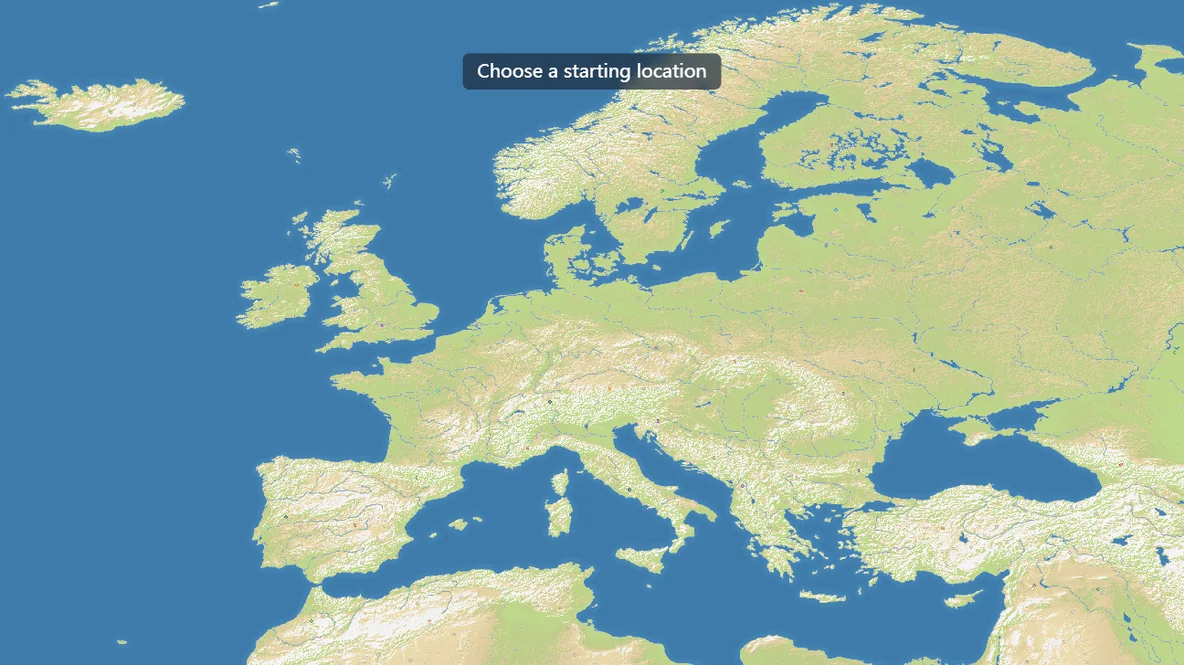
OpenFront.io Europe map at spawn selection, with light green plains east of the Alps and mountain terrain in Scandinavia
Choosing a spawn on Europe The green plains east of the Alps offer room to expand. Along the coast, look for a route inland before locking in your spawn.
Read the map in this order

Zoom out to find nearby players, then switch to the terrain view and trace two ways out of your spawn. Choose a primary route and a backup. A quiet peninsula is attractive while the inland exit stays open, and risky once a stronger neighbor controls that exit.

OpenFront.io units and buildings

Territory and cities support your troop cap. Spend gold on the structure that solves the immediate problem, then use ships and defenses where they can protect that investment.

City
Raises your troop cap.
Build one behind your front when you have room to grow and expect to need a larger reserve.
Port
Sends out trade ships and enables warships.
Choose a coast with trade partners, room to defend, and a sea route you can keep open.
Factory
Starts rail trade with connected stations.
Use it where nearby cities or ports can support a network, if the lobby enables factories.
Defense Post
Slows attacks and makes advances through covered land more costly.
Cover a choke point or threatened border that protects valuable territory.
Warship
Engages hostile ships and can capture trade ships.
Patrol crossings or protect a working trade route. Build a port first.
Transport ship
Carries troops to attack across water.
Land at a reachable shore when you can afford to commit troops away from home.
SAM Launcher
Intercepts incoming nuclear attacks in its coverage area, subject to cooldown.
Keep important cities or economic hubs within range when nearby opponents can launch missiles.
Missile Silo
Lets you launch nuclear weapons that are available under the match rules.
Build it when you can pay for a useful launch and have troops ready to exploit the opening.

First-build example. If you have a quiet inland border and your troop cap is holding you back, build a City. If an enemy can enter through a single narrow pass, a Defense Post there may buy more time. A Port pays off only if ships can actually trade.

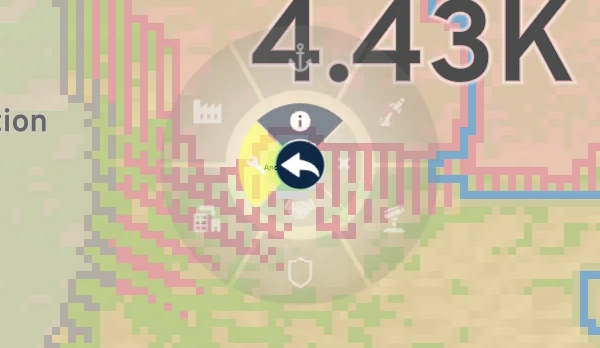
In-game radial building menu with city, factory, port, and defense icons over the map
Finding buildings in the radial menu Open the wrench submenu on the map to see the available structures. Placement and match rules determine which options you can use.

An opening strategy for OpenFront.io

The first goal is a position you can defend and grow from. Play OpenFront.io against bots in Solo mode before joining a public lobby. After each attack, check the event panel for any advance still in progress before you commit troops elsewhere.

  1. Spawn with room in two directions

    Give yourself space from human players and favor terrain you can capture cheaply. Pick a direction for expansion and an exit if that route closes. Starting close to a strong neighbor can put you under pressure before you have affordable options.

  2. Take nearby land in small commitments

    Set a modest attack ratio while taking neutral land. After each move, check whether your reserve is recovering and how much easy land remains. Stop and let troops recover when new attacks only add hard terrain or stretch your exposed border.

  3. Choose your first contested border

    Hover over nearby opponents and check their defending troops. Look for a small target with an achievable objective, such as a passage, a compact border, or access to a coast. A bigger country can be a good temporary ally if each of you benefits from keeping that border quiet.

  4. Spend gold around your next move

    Match your first build to the plan. A City gives you capacity for a bigger army. A Defense Post can secure a vulnerable approach. A Port supports a coastal economy if trade is viable. Place economic buildings where your opponent would have to cross a defended line to capture them.

  5. Recheck the map before you push

    Watch the event panel for new attacks, then zoom out to check the next border. If your target has a second front, let it spend troops before you commit. During a fight, preserve enough reserves to defend at home and pause if another player opens a front behind you.

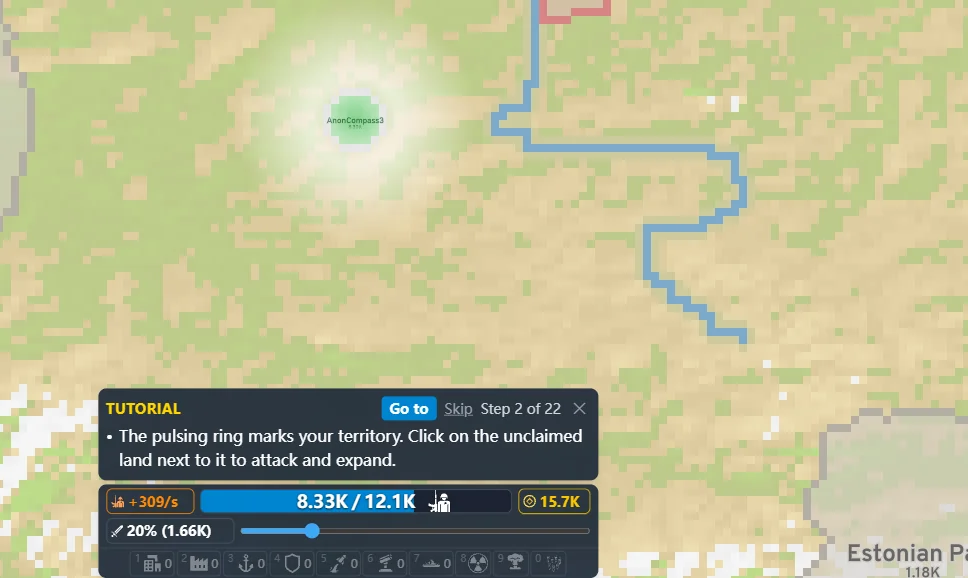
An OpenFront.io starter territory beside a river, with the troop reserve and attack ratio visible in the bottom control panel
Checking your troop reserve before expanding The bottom panel shows your current troops and the share your next attack will send. Check both before moving into unclaimed land.

Inland start

Expand across the nearby plains toward a choke point. If two players can reach you, keep more troops home and concentrate on one border. Build a City behind the line and use the larger reserve to contest the easier front once it opens.

Coastal start

Secure the land connection first. If you can trade safely across the water, a port gives you an economic route and unlocks warships. Consider a transport only after checking that you can still hold your home coast and your inland border.

Try this in a solo match. Before your first attack on a neighbor, pick a goal you can see on the map, such as reaching a river bend. Stop when you reach it and compare your reserve to the next two opponents on the border. In the next run, keep the same spawn and attack earlier. Compare how many troops you end up defending with and whether the territory you gained is still worth holding.

Desktop controls worth learning

Space switches the map view. T and Y adjust the attack ratio. C centers the camera on you. Check the in-game settings for your bindings and whether your primary click opens the menu or attacks.

OpenFront.io FAQ

Answers to common first-match questions.

What is OpenFront.io?

OpenFront.io is a real-time strategy game that runs in your browser. You expand from a spawn point, balance troop growth with attacks, and use diplomacy, buildings, and ships to compete for territory.

Where can I play OpenFront.io in my browser?

Choose Play OpenFront.io to open the official game. You can start with the in-game tutorial, try a solo match, or join a public lobby. The browser version runs without a download.

What is the best map for beginners?

Try Europe in solo mode and look for a quiet start near open plains. Repeat the same map with a different spawn to see how mountains and crowded borders affect your timing. If you want to practice transport landings, pick an island map next.

What attack ratio should I use?

Use a smaller share of your troops when neighboring neutral land is easy to claim. Before committing more against a defender, check their troops, the terrain, and how exposed your own border will be. The right setting changes as the match develops.

Can I play OpenFront.io against bots?

Yes. Choose Solo in the game lobby to practice against AI. Start with the in-game tutorial if you are new to the controls. In Solo, you can pause to check a border or experiment with a different first build.

How do I cross water in OpenFront.io?

Send a transport attack toward a reachable shore. Check for enemy warships along the route and account for the troops tied up during the crossing. Practice a nearby landing before trying to hold a distant island.